 roost
roost
What roost is
roost is an on-demand tmux agent view for wrangling multiple AI coding agents — without giving up your normal tmux setup or switching to a different terminal.
It runs on its own isolated tmux server with its own config, so your everyday tmux (config, sessions, plugins, muscle memory) is never touched. Launch it with one command, run your agents as panes or windows inside it, and each is badged with what its agent is doing:
💥 error · 🛑 blocked · ⏳ working · ✅ done · 💤 idle. The first two are the ones waiting on a person.
State comes from each agent's own lifecycle events — Claude Code hooks, the opencode plugin, the GitHub Copilot CLI extension, or one roost state call from anything else — not from scraping process names or terminal output, so it is accurate rather than guessed. No compiled binary, nothing that reaches into ~/.tmux.conf.
This is what a session looks like:
roost view, rendered by preen.
Requirements
tmux≥ 3.2 (needs pane options,#{P:}pane loops, anddisplay-popup)git- A powerline/Nerd Font for the tab separators — or run
roost initand pick the plain-separator fallback - An agent that can report its state, for the badges — Claude Code, opencode 1.x (2.x is not supported yet), GitHub Copilot CLI, pi and OpenAI Codex CLI all have adapters in this repo, and the installer wires whichever of them you have; anything else calls
roost state. The view itself works without any of them - Optional:
fzf(for theprefix aagent switcher) - Optional:
preen(renders an agent's markdown forroost read --render; without it that flag prints the raw text)
Install
curl -fsSL https://raw.githubusercontent.com/beatzball/roost/main/install.sh | sh
That does two things, and it is worth ten seconds to know which is which, because two different things here are called "install".
1. It places roost. Clones it to ~/.local/share/roost and adds its bin/
to your PATH. It works out which startup file your shell actually reads,
rather than assuming zsh: .zshrc for zsh (honouring ZDOTDIR),
.bash_profile or .bashrc for bash depending on your platform,
config.fish for fish. Re-running it will not add the same line twice, and an
unrecognised shell gets a line to paste rather than a guess.
2. It wires your agents, in the same step, by running roost install for
you. That is the part that makes the badges work: until a harness has roost's
adapter, its pane is never badged and roost looks broken. It touches only
harnesses you already have, and only their own agent config — one symlink each
for opencode, pi and copilot, roost's hooks merged into Claude's and codex's
settings, and copilot's EXTENSIONS flag turned on.
Piped from curl it cannot stop to ask you: stdin is the script itself, so a
prompt there would eat the rest of the script. So it prints a block naming
exactly what it will write, says that every file it edits is backed up beside
itself as <name>.roost-bak-<timestamp>, and tells you how to skip it — then
goes ahead. Run from a clone in a terminal, it asks first, and only you know
what you answered.
Options
./install.sh --dir ~/tools/roost   # clone somewhere else
./install.sh --symlink             # symlink bin/roost into a PATH dir instead
./install.sh --symlink ~/bin       # ...or a specific one
./install.sh --no-wire             # place roost, wire nothing
./install.sh --dry-run             # print what it would do, change nothing
--symlink with no directory picks the first writable directory already on
your PATH. It checks rather than assuming: /usr/local/bin is the
traditional answer and is frequently root-owned.
--no-wire stops after the PATH line. Run roost install yourself whenever
you want the second half.
roost install — the other one, for later
roost install is that second half on its own, and it is the command to reach
for after the first day:
roost install    # wire every installed harness to this checkout
roost update     # the same thing — a real alias, not a second command
Neither of them fetches new roost code. They re-wire the checkout you already have to whatever is installed on the machine now. Run either one when you:
- install a harness roost had not seen when you first ran it
- move, re-clone, or switch to a different roost checkout (claude and the three symlink adapters are repaired for you; codex is refused on purpose — see below)
- take a roost release that adds a new adapter
It is safe to run again and again. Hooks you already have are kept and roost's
join them — a PostToolUse formatter of your own survives — and a second run
adds no duplicates. Anything sitting at an adapter path that is not roost's is
left exactly as it was found and named in the output, with the command to
replace it yourself if that is what you want. Every file it edits is backed up
beside itself first.
roost install --dry-run     # print the plan and change nothing
roost install --only pi     # one harness (opencode, pi, copilot, claude, codex)
roost install --print-only  # never edit JSON — print the blocks to paste
roost install --help        # the rest of the flags
Two steps are left for you, and no tool can do either — both are prompts
somebody has to answer. roost install lists whichever apply to your machine
when it finishes:
- codex — start
codexonce and answer "Trust all and continue" at itsHooks need reviewprompt. Until you do, codex silently runs no hook at all. - copilot — the first time you run it in a directory, answer Yes to "wants to: handle permission requests". Once per directory, and nothing on disk records it.
Both are covered in full on Enable the state badges.
By hand
roost is just a script, so this is all the placing half does:
git clone https://github.com/beatzball/roost.git roost
export PATH="$PWD/roost/bin:$PATH"   # add to your shell's startup file
Then roost install for the wiring half, or wire each harness yourself from
Enable the state badges.
The launcher resolves its own location (following symlinks), so it finds its config and scripts no matter where you run it from.
Upgrading
To upgrade roost, run the install command again. There is no separate upgrade command:
curl -fsSL https://raw.githubusercontent.com/beatzball/roost/main/install.sh | sh
On a machine that already has roost it does three things instead of the first
two: git pull --ff-only in the clone it made, skip the PATH line it added
the first time rather than adding it twice, and wire your agents again. That
last one matters more than it sounds — a release can add an adapter for a
harness that had none, and both claude and codex record roost's hook by
absolute path, so a checkout you have moved or re-cloned needs wiring again
either way.
Roost tells a moved checkout from a second one by asking whether the path a hook names still exists. A hook pointing at a checkout that is gone is roost's own and broken, so claude's is replaced, exactly as a dangling symlink is relinked. A hook pointing at a checkout that is still there belongs to someone who meant it, and roost never touches it.
Codex is refused either way, and that is deliberate. It keeps a hash of
each hook handler and silently skips any whose hash has changed — nothing
printed anywhere — so rewriting one would un-badge a machine that had already
granted trust. roost says the checkout is gone instead of blaming a different
one, and leaves the fix to you: roost hooks codex, then copy the object into
~/.codex/hooks.json.
Run it from a directory that is not itself a roost clone and there is nothing more to it: one copy of roost on the machine, pulled up to date, your shell startup file untouched, your agents wired again.
Four things to know:
-
Where you are standing when you run it decides which checkout it installs. The script works out where it lives from
$0— and in the piped form there is no script file, so$0is justshand "where it lives" comes out as your current directory. Run the line while standing in a roost clone and it installs that clone, saysinstalling from this checkout, and pulls nothing. That branch is deliberate, so neither this nor./install.shcan yank code out from under a checkout you are working in — but it is easy to hit by accident, and it looks like an ordinary successful upgrade. It also puts that clone on yourPATH, ahead of the copy you meant to upgrade, so from then onroostruns the one you happened to be standing in — it all looks stale or wrong, with nothing on screen tying it back to a directory you were in once.cdsomewhere else first, and read the two lines below if you are not sure you did. -
If roost is not in the default place, pass
--dir. The bare line looks only in~/.local/share/roost. Installed anywhere else it does not find it, clones a second copy at the default, and you now have two:curl -fsSL https://raw.githubusercontent.com/beatzball/roost/main/install.sh | sh -s -- --dir /path/to/roost -
A clone you have committed to is never clobbered. The pull is
--ff-only, so where it cannot fast-forward it sayscould not update; keeping what is thereand carries on with thePATHand wiring steps rather than stopping. Nothing of yours is rewritten; sort that checkout out yourself when you want the new code. -
roost installandroost updatedo not fetch new code. They wire your harnesses to the checkout you already have, and that is all. When git already knows locally that your checkout is behind, they tell you how far and print thegit pullto run — they never go to the network to find out.
Check it upgraded the copy you meant
The script announces its choice in the first two lines it prints: the branch it took, then the path it took it on. You get one or the other, never both.
roost: already cloned                  # found that clone and pulled it
  ~/.local/share/roost

roost: installing from this checkout   # installed it as it stands, no pull
  ~/src/roost
Read the path. If it is not the install you meant to upgrade, stop there — the rest of the run happened to a different copy.
First run
roost doctor   # check tmux version, truecolor, fzf, hooks, adapter links, notifier
roost init     # pick theme, glyph set, separator style; print the Claude hooks
roost          # start/attach the default session ("main")
roost doctor is the one to run if a pane is not badging: it names the harness
that is not wired, and every state roost install can resolve ends its line
with , or run: roost install — a missing adapter, a dangling one, a codex
hooks.json with none of roost's handlers, copilot's EXTENSIONS flag, a
Claude Stop hook from before --stop-hook existed.
A line without that tail is one no installer may fix for you: something that is not roost's sitting at an adapter path, hooks pointing at a different checkout, or one of the two prompts a human has to answer.
Detach with the prefix then d, like any tmux. The prefix is Ctrl-s.
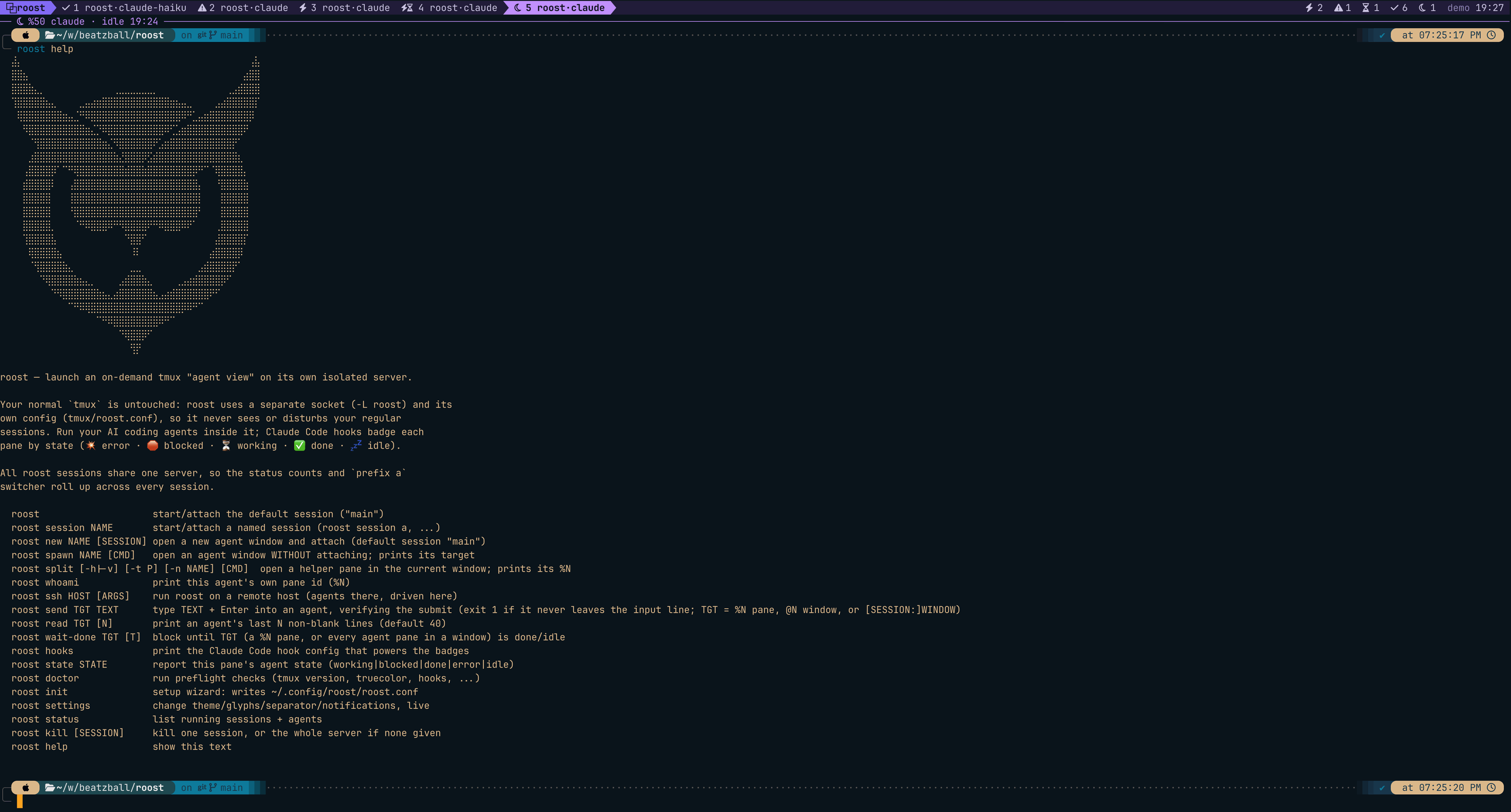
roost help prints the full command list, with the owl on top:
Next: Setup and settings, then Enable the state badges.
Prior art and credit
Watching agent state from inside tmux is a well-trodden idea; roost is a deliberately minimal, isolation-first take on it. If you want a richer, sidebar-style experience, these projects pioneered the approach and are worth your time:
- hiroppy/tmux-agent-sidebar — a live sidebar with prompts, tool calls, worktrees, subagent trees
- accessd/tmux-agent-indicator — pane-border / title / status-icon signals
- samleeney/tmux-agent-status — sidebar + fzf target switcher
- craftzdog/tmux-claude-session-manager — a popup picker across running Claude sessions
- flavio87/tap-to-tmux — phone push when an agent is waiting for input
roost trades their richness for staying completely out of your primary tmux and owning nothing but a few small shell files you can read end to end.